Description
The Microsoft Excel TEXTJOIN function allows you to join 2 or more strings together with each value separated by a delimiter.
The TEXTJOIN function is a built-in function in Excel that is categorized as a String/Text Function. It can be used as a worksheet function (WS) in Excel. As a worksheet function, the TEXTJOIN function can be entered as part of a formula in a cell of a worksheet.
Syntax
The syntax for the TEXTJOIN function in Microsoft Excel is:
TEXTJOIN( delimiter, ignore_empty, text1, [ text2, ... text_n ] )
Parameters or Arguments
delimiter
A string inserted between each text value in the resulting string. Most commonly, you would use a delimiter such as a comma or space character.
ignore_empty
Determines whether empty values are included in the resulting string. TRUE ignores empty values and FALSE includes empty values in the result.
text1, text2, ... text_n
The strings that you wish to join together. There can be up to 252 strings that are joined together.
Returns
The TEXTJOIN function returns a string/text value.
Applies To
- Excel for Office 365, Excel 2019
Type of Function
- Worksheet function (WS)
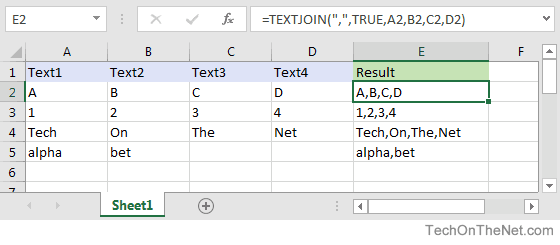
Example (as Worksheet Function)
Let's look at some Excel TEXTJOIN function examples and explore how to use the TEXTJOIN function as a worksheet function in Microsoft Excel:
 با نام و یاد خدا